
How to log in to 1xBet
Logging in gives you your balance, open bets, history and cashier. Use your e-mail or ID and password, or log in directly with Telegram, Google or X.
- E-mail or ID + password
- Telegram, Google, X
- Forgot password?
Logging in step by step
Tap Log in, enter your e-mail or ID and your password, then confirm.
- Open the official site or the 1xBet app.
- Tap the blue Log in button at the top right, next to Registration.
- In the first field, enter your account e-mail or your ID (the number you got with a one-click sign-up).
- Enter your password. The eye icon shows it so you can check for typos.
- Tick Remember me only on your own phone, then confirm.
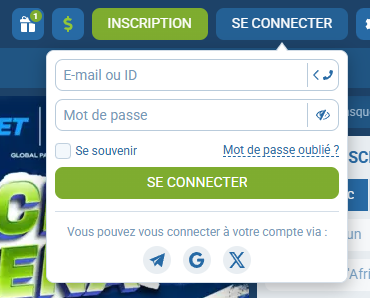
A phone icon next to the first field lets you switch to logging in with your phone number to be confirmed .
Forgotten password
Use the “Forgot password?” link next to Remember me. A reset link or code is sent to the e-mail or phone linked to your account.
Then choose a long password you don’t use anywhere else. Never share it — not even with someone claiming to be from 1xBet.
Login problems
| Problem | What to do |
|---|---|
| Wrong ID or password | Check caps lock and keyboard language, then reset your password |
| Code not received | Check the number or e-mail on your account and ask for a new one |
| Account blocked | Call customer service on 8118 |
| Site won’t open | Update the app or use the official site; avoid unknown “mirror” links |
Keeping your account safe
A unique password and two-factor authentication, where available, make your account much harder to break into.
- Only log in on the official site or app.
- Don’t tick Remember me on shared phones, and log out afterwards.
- Turn on two-factor authentication if it’s offered to be confirmed .
Frequently asked questions
I signed up in one click — what are my login details?
The ID and password shown at the end of registration. Enter the ID in the e-mail or ID field. Lost them? Use “Forgot password?” or call 8118.
I registered with Google or Telegram. How do I log in?
Tap the same icon (Telegram, Google or X) under the Log in button.
Can I use the same account on the website and the app?
Yes. One account works everywhere.
Logging in with Telegram, Google or X
Under the Log in button you can sign in with Telegram, Google or X.
This works if your account is linked to that service — for example because you registered through social media. Always use the same one: a different social account won’t find your 1xBet account.